Reverse Proxy implemented with Nginx
A reverse proxy is a component responsible for routing incoming requests to the correct service. Each service consists of its own web server, which is exposed on a specific port for access. Often, you don’t want to remember the ports of these services; instead, you want to access them through a single address. This is where the reverse proxy comes into play.
In a reverse proxy, routing is generally done in two ways: using subdomains or subpaths.
Using subdomains; oskari.forsblom.xyz where oskari is subdomain for domain forsblom.xyz
Using subpaths; For example, forsblom.xyz/blog could be routed to a blog platform using the path routing rule /blog.
Subdomains are usually the preferred method when routing to different services, while subpaths are used for routes within a single service.
Nginx is a web server software that serves the content published on it as sites. Nginx is also a commonly used software for implementing a reverse proxy. Nginx is configured through configuration files. In Nginx, there are two directories that play a key role in configuration and deployment: sites-available and sites-enabled.
You place the configuration for each site—in this case, each subdomain—in the sites-available directory. Then, you create a shortcut to it in the sites-enabled directory, which in Linux terms is a symbolic link. This way, you maintain the configuration in one place, while using symbolic links to manage which sites are actually active.
This is an example of subdomain routing rule as a site configuration file:
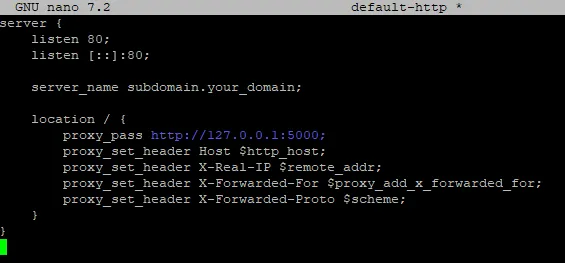
In my case, the reverse proxy also has another purpose: it is the point where encrypted traffic is terminated. Nowadays, client devices require encrypted connections so I use Let's encrypt certificates. Let's Encrypt certificates are valid for 90 days. Fortunately, a convenient tool called Certbot has been created to manage certificates. It allows you to obtain and renew certificates issued by Let's Encrypt. Certbot can also install certificates on all commonly used web server software, such as Nginx.
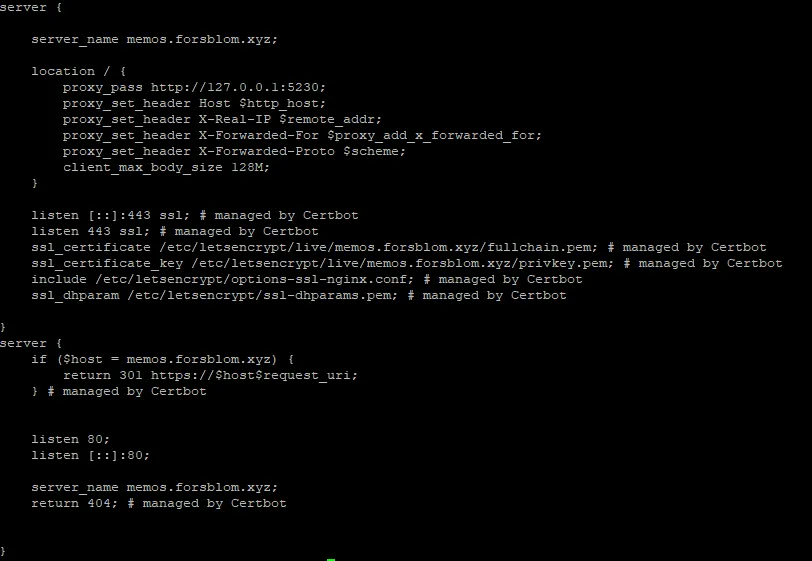
Certbot can automatically modify Nginx site configurations. The software appends a # managed by Certbot comment to all the lines it adds. In practice, Certbot modifies the original configuration so that the site is served on port 443 instead of port 80. Port 443 is the default port for encrypted traffic; when you type https:// in a browser, it automatically directs the request to port 443. Port 80, on the other hand, is the default port for unencrypted HTTP traffic.
Additionally, Certbot adds information about where the certificate and its private key can be found. It also appends a redirect rule at the end, so that unencrypted requests to port 80 are redirected by the reverse proxy to the encrypted port 443.
Of course, using certificates requires that you have a domain name registered for your website. You also need to register all the subdomains you want to use, and they must point to the server where your reverse proxy is installed.
The certificate authority—in Certbot's case, Let's Encrypt—needs to verify that the domain for which it is issuing a certificate is indeed owned by you. Certbot automates this process by temporarily serving a service on port 80, which exchanges the necessary information with Let's Encrypt for the certificate signing process. In my case, I need to open port 80 to the public Internet when renewing certificates from Let's Encrypt.